1
Open Instagram
Open the Instagram app on your phone or visit Instagram.com on your PC, then log in to your account.
Fast, free, and easy. Paste your Instagram link and download in HD quality.
Simple workflow
1
Open the Instagram app on your phone or visit Instagram.com on your PC, then log in to your account.
2
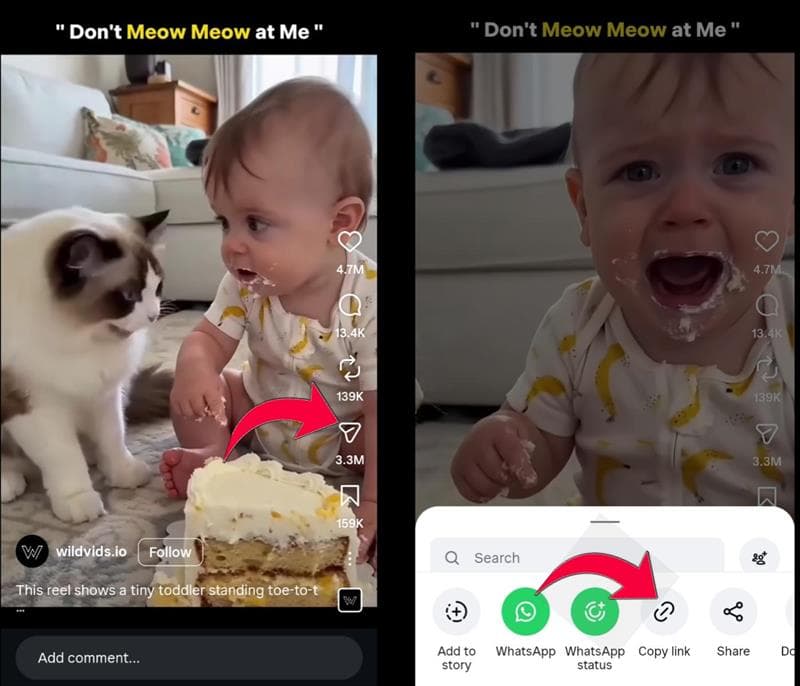
Find the content you want to download, tap the three-dot menu above the post or the Share button, then select Copy Link.
3
Copy the URL of the Instagram video, reel or photo that you want to download.
4
Open FetchInsta and Paste the link in the input box above and start processing.
5
Click on Download button and it will start fetching the content from instagram and within seconds your content will show here.
6
Now Click on other Download button again to save the fetched video, reel or photo to your device and it will start downloading in your device.
Instagram (often abbreviated as IG or Insta) is a social media platform where users can share photos and videos with their followers.
Users can download the free Instagram app on iOS and Android to explore features like photos, Stories, Reels, and built-in video editing tools.
Every day, millions of photos and videos are shared on Instagram, but the platform does not always provide a direct download option for posts. A convenient way to save content you are allowed to use is by using third-party tools like the FetchInsta downloader.
FetchInsta is an Instagram video downloader that lets you save videos, Reels, photos, Stories, and IGTV content on any device, including PC, Mac, Android, and iOS.
Built for speed
Download Instagram photos and videos in the best quality available from the original public post.
FetchInsta lets you download Instagram(IG, Insta) videos in HD quality without any loss from the original resolution.
FetchInsta allows you to download Instagram Reels videos in MP4 format on any device, including PC, Mac, Android, and iOS.
Instagram Photo Downloader of FetchInsta makes it simple to download and save Instagram images, letting you easily grab photos from any Insta post.
Our tool is intended to help you download videos and images from your own posts or from public content you have permission to save. We reserve the right to deny service if it is used to violate others' privacy or intellectual property rights.
Before using our app or website, please read our Terms of Service (ToS) carefully. Here are the key points you should know:
By continuing to use our app or website, you agree to our Terms of Service, including any future updates. If you do not agree with any part of these terms, please discontinue using our services immediately.
An Instagram Downloader is a tool that lets you download videos, photos, Stories, Reels, and IGTV from Instagram. It supports downloading content on all devices, including PC, Mac, Android, iPhone, and iPad.
Step 1: Find the post you want to download and copy its link (video, Reel, or image).
Step 2: Go to fetchinsta.com, paste the copied link into the input box, and click the Download button.
Step 3: Wait for the FetchInsta server to process the link, then download and save the video, Reel, or image to your device.
For iPhone, use the Safari browser on iOS 13 or later: go to fetchinsta.com, paste the Instagram video link, then tap Download.
Copy the Instagram link, go to FetchInsta.com, paste the link into the input box, then click Download.
You can download Instagram Stories when a public, accessible Story link is available. Copy the Story link, paste it into FetchInsta, and click Download.
Instagram does not always provide a direct download option for posts. You can visit fetchinsta.com and follow the steps there to save photos, videos, and more for personal use.
FetchInsta.com is a free Instagram downloader that lets you download videos, photos, Reels, Stories, and IGTV without any limitations.
Please check the 'Downloads' folder in your phone or the 'download history' section of your browser.